
Listen read aloud, 5 min — or as a conversation, 8 min
The Habit on Your Side
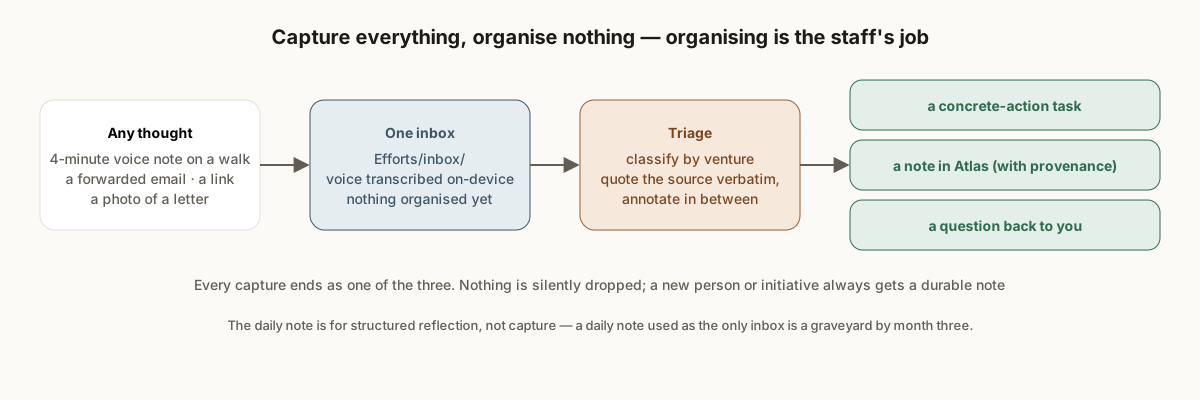
None of the briefs work unless everything you think of actually enters the system. The rule is short: any thought, voice note, forwarded email, photo, or link goes to one place, and triage guarantees every capture reaches a disposition. The habit worth building is on the human side — capture everything, organise nothing. Organising is the staff’s job.
Two entry points, both landing in the same Efforts/inbox/:
- The messaging channel, from the phone. A voice note on a walk; a forwarded email; a screenshot of a letter; a one-line “remind me to…”. The channel coordinator pulls it, transcribes audio on-device, and drops the transcript into the inbox.
- The inbox folder directly, from the laptop. A file dragged in; a note from the review surface; a hand-off from another session.
Triage in Two Phases
The triage command runs in two phases, partitioned by what the capture is:
Phase one — the chief of staff itself handles captures that need its authority: dispositions from the review surface (“close this”, “re-label that”, “here’s a note on the report”), hand-offs from curators, briefings from other sessions. It performs each action, archives the source with provenance, and commits.
Phase two — the inbox triager (a vault-side team member with no external credentials) handles free-form captures: voice-note transcripts, forwarded emails, idea dumps. For each it classifies by venture, drafts tasks, and archives what it processed. It cannot edit Atlas/; anything that needs a note or a structural call is flagged up for the chief of staff to make.
Every capture ends as one of three things — a concrete-action task, a note in Atlas with provenance, or an explicit question back to you. Nothing is silently dropped. A capture the triager cannot place goes to a _needs-clarification list that surfaces in the next brief.
The Voice-Note Format
The single-tap voice message turned out to be the highest-bandwidth capture path in the system, and it produced its own formatting rule. For any long capture, the assistant quotes the source verbatim, chunk by chunk, and annotates in between:
“…and the other thing, the lawyer said the timeline is probably six weeks but that depends on the—” → Task: Ask the lawyer what the six-week timeline depends on (
venture-x,@async) → Note: timeline ≈ 6 weeks, conditional — recorded on the venture hub with provenance.
So you can verify nothing was misheard or dropped. One four-minute note routinely becomes half a dozen tasks, a couple of vault updates, and a question or two back. See Voice notes are the killer input.
Rules Learned the Hard Way
- A new person or initiative gets a note and a task. Never a bare task. (See Concrete actions only.)
- Named things get listed, not buried. When a capture names three specific places, people, or options, each appears in the output by name. Folding them into another item’s prose reads to the human as “you ignored what I said.”
- Relative dates get resolved and echoed. “Tomorrow” at 1 a.m. means today. The triage output says the absolute date.
- Smoke-test data must not look real. When you test the pipeline, use captures that are obviously synthetic, or you will spend an hour chasing a fake deadline.
- The daily note is not the inbox. Structured reflection lives there; captures do not. A daily note used as the only capture surface is a graveyard by month three.
Why This Is a Ritual, Not a Feature
Capture only works if it is unconditional: you never decide whether something is worth capturing, you never decide where it goes, and you never organise it at capture time. Every one of those decisions, made in the moment, is a place where the thought gets lost. Make the one-tap path so cheap that the decision disappears, and let the system do the rest on its own schedule.
Hand this to your chief of staff. Plain Markdown: /guides/capture-everything-organise-nothing.md. Tell it: "Read this guide and tell me what in our system it would change."
Also for your Claude: whole-site index · bootstrap prompt · guide feed